How It Works(2) || The working of Parallel Space App and Android virtualization
Virtualization in Android OS
Virtualization in Android has always been a great topic of discussion. Unlike traditional desktop computer virtualization, which allows us to emulate another operating system inside the host system, virtualization in Android is achieved by hosting multiple users or profiles inside the same mobile device, often referred to as a “phone within a phone.” This technology allows applications to run inside the virtualized system while believing they are actually running directly on the original device. This grants users various privileges, such as bypassing root detection or Frida detection. More importantly, it allows users to create multiple profiles for the same app on a single device, letting them utilize first-time discount coupons and other privileges more than once.

This multi-instancing of commercial applications generates significant problems for application owners. Consequently, many game and banking apps employ security SDKs to prevent multi-instancing via virtualization by detecting famous apps like Parallel Space, Island, etc.
Despite its popularity, Android virtualization is a highly complex technology. When a virtualization app attempts to run a guest app inside a virtual environment, it must bypass four major security features of Android:
- UID Every App has its own UID. During calling of any activity inside the guest application or any intent resolution , the Android OS needs to fetch the UID of that application. This verification mechanism has to be bypassed in order to run the guest app under the host’s identity.
- Manifest file Android refuses to launch any Activity, Service, or Receiver that is not explicitly declared in the
AndroidManifest.xmlfile at time of installation. Since guest apps are added after the virtualization app is installed, it becomes one of the hardest hurdle to bypass. - Binder Communication The virtualization app might not have the same permissions as the guest application. This makes it difficult to fulfill intents or commands—such as camera or microphone access—that the guest application is supposedly allowed to perform, requiring the interception and modification of Binder calls.
- Storage paths In Android, storage paths for an app are decided when the app is installed. If the app runs inside a virtual environment and tries to access its default data storage directory, it will not find the data stored within the virtual directory, causing a system crash.
Despite of these complex hurdles virtualization apps are able to bypass them and create virtual environment to facilitate multi-instancing. Today we will analyze the most famous Android multi-instancing application that use virtualization to create a fake environment for any particular application: Parallel Space App.
Parallel Space Application

Parallel space is an Android app that created isolated virtual runtime environment to run multiple instances of the same app simultaneously, keep separate accounts and isolate apps from the main profile. It does sandboxing, user profile duplication and virtualization instead of modifying anything inside the original app’s code logic.
- Virtualized environment It launches a virtual container inside the Android userland. This provides a separate space to run the app with its own data directory, process tree and system-visible identifiers.
- App cloning To clone the application inside the device, parallel space app does not recompile or modify the app but it instead registers to the system as a host wrapper and loads the target application inside its own sandbox and with its own environment identifiers.
- Namespace and resource redirection Parallel Space app intercepts and redirects Android APIs and resources so that the cloned app sees an isolated and consistent environment.
Reverse engineering the application
Now it is time to analyze our cloning app by taking one step further. We will reverse engineer the app using JADX and Frida to understand its internal mechanisms :
- Bypassing AndroidManifest restrictions
Standard Android applications must declare all their Activities within the AndroidManifest.xml file. This allows the Android OS to recognize these components and determine which Intents should resolve to which Activities.
However, as Parallel Space app cannot know beforehand which apps a user will choose to clone, it cannot declare those foreign activities in its own manifest. Instead, it executes some particular techniques to act as a dynamic mediator between the Android OS and the cloned application.

- AndroidManifest of Parallel Space app showing registered DummyActivity.
When we examine the AndroidManifest.xml of Parallel Space, we see a DummyActivity registered. This serves as a stub or placeholder that the Android OS recognizes and expects to run.
When a cloned app attempts to launch its own activity like com.chrome.app.activity . Parallel Space intercepts this call and to the Android OS, it looks like Parallel Space is simply launching its own com.excelliance.kxqp.ui.DummyActivity. However, Parallel Space loads the target app’s code into this dummy shell.
1
2
3
This is exactly why opening /proc/self/maps during a session yields surprising results. You won't see the cloned app's name anywhere in the process header.

Since Parallel Space is technically the one running the DummyActivity, the OS only sees Parallel Space's footprint. The cloned app is merely 'piggybacking' inside that process, which is why the system traces lead back to the host app, not the clone.

- frida-trace output showing use of DummyActivity by the Parallel Space App.
The output of the frida-trace tool shows the logs when a cloned app is launched using the parallel space app.
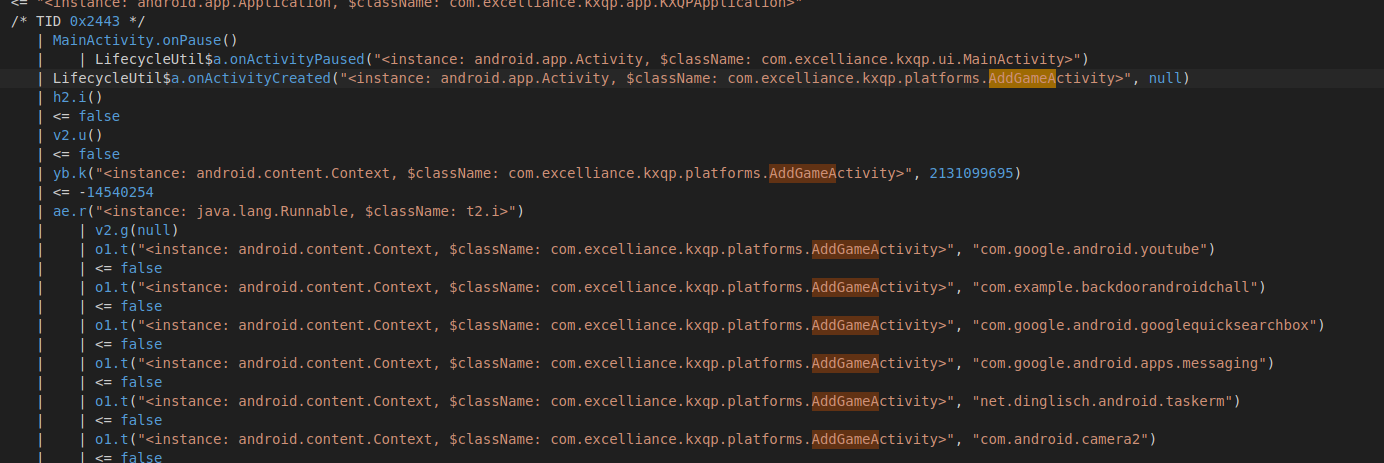
- frida - trace while adding the target app to virtual environment. The Parallel Space app checks if there are common apps inside the original host device like facebook, messaging, youtube and others by hooking the package manager service.
Parallel Space app clones some apps at the time when we download them like youtube, facebook and chrome. It hooks the PackageManager service of the Android OS to check this. It does use the permission QUERY_ALL_PACKAGES for this.
- Activity Manager Service Hooking
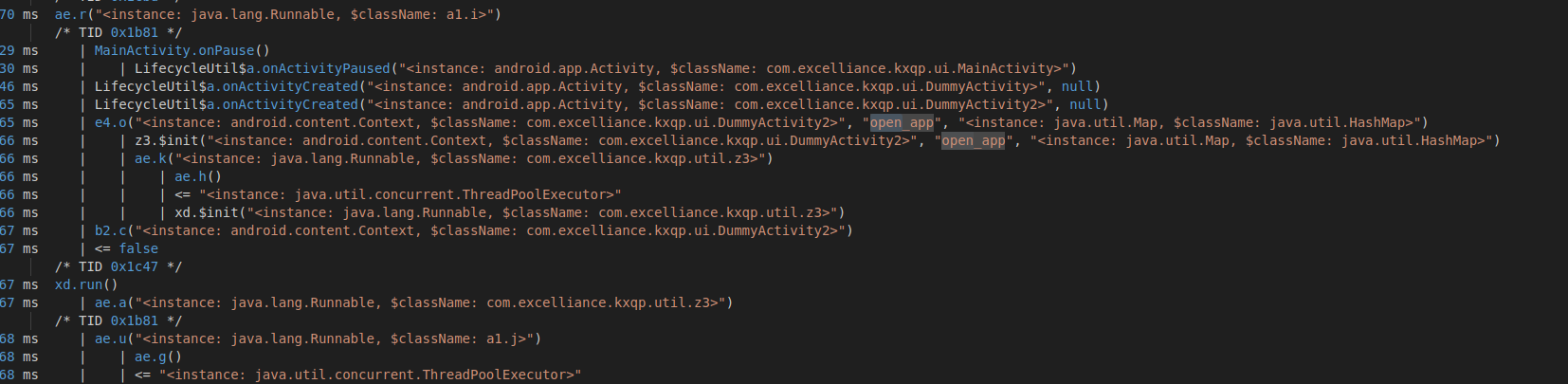
- Hooking AMS while starting the target app. This is to hook the
startActivityfunction and intercept the requests of the app going to and fro from the OS, creating a fake interception service.
This is also to make sure that when an activity of the cloned app starts another activity of the cloned app then it will be able to resolve it and launch it.
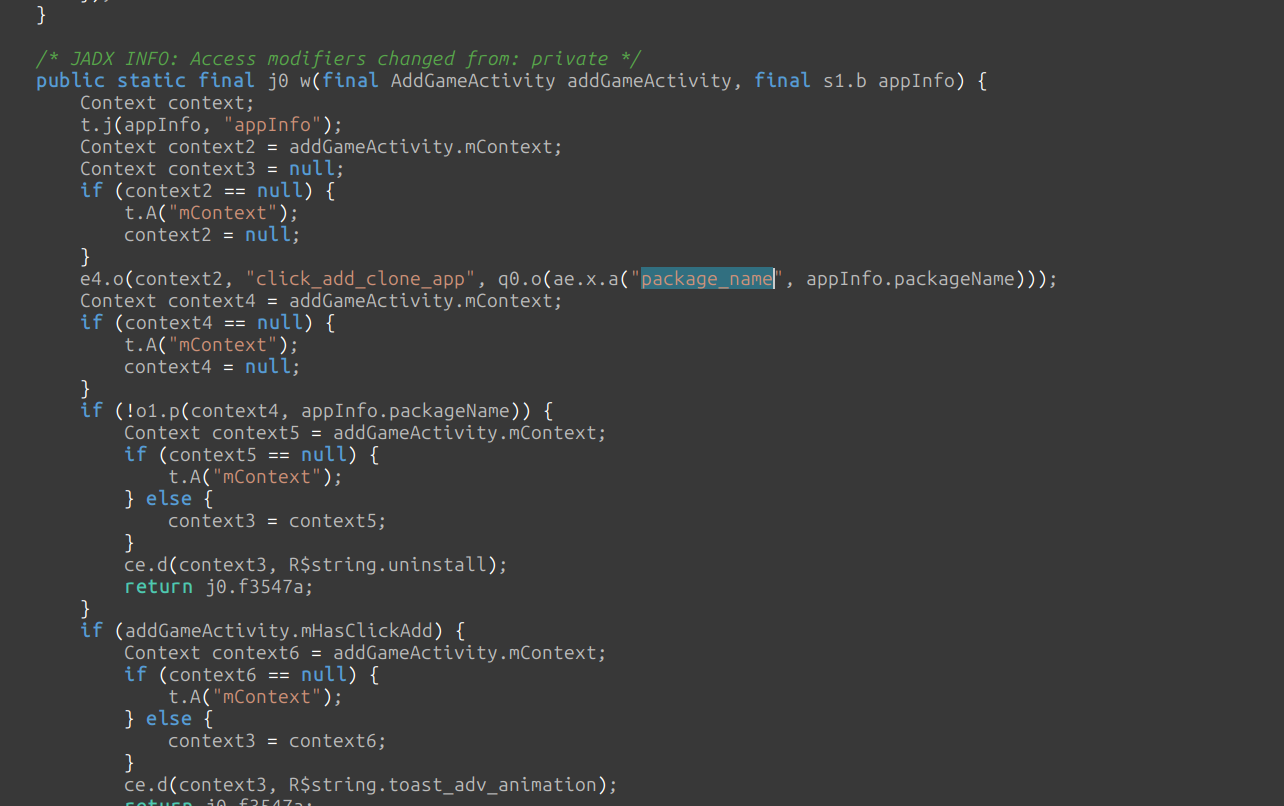
- This function is reponsible for adding a cloned application into the virtualized environment.
It captures the package name and other details of the target application like its storage directory path, uid, cpu environment, etc.
- ClassLoader Injection
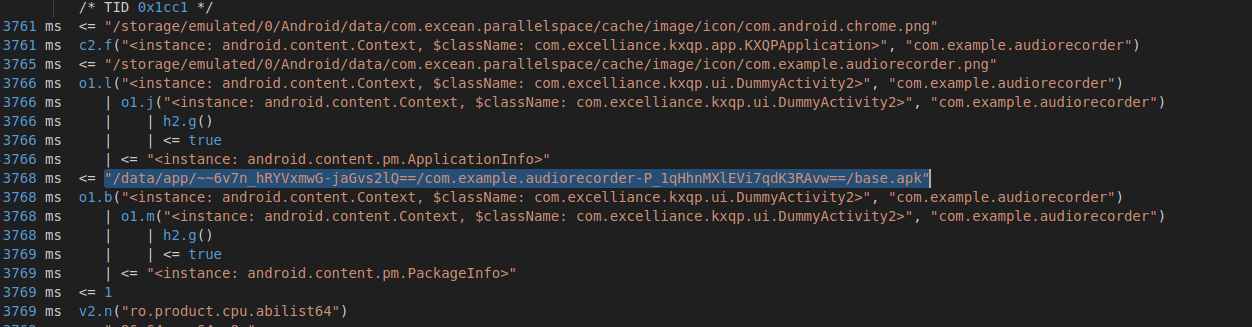
- Loading the original base.apk from its original path inside the host device.
Many people might think that our Parallel Space app copies the original application into the new environment but that is not the case as that would be a disaster for out phone’s storage.
There is no new application copied or created inside the virtual environment. The Parallel Space app loads the original activities of the application by loading it dynamically using reflection. It creates some virtual mappings into its small environment so that when resolved on execution then they will open the functions of the original app and borrow its original code.
Basically when we open the cloned app then we open the same app but only the environment variables and some particular properties of the app like uid and pid are changed due to the sandbox created by the parallel space app.
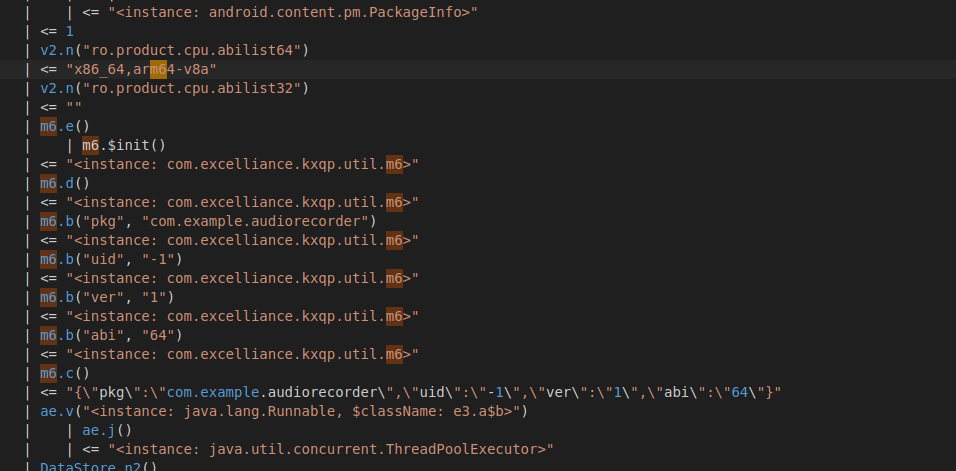
- Getting all the environment vars and data from the files of the original APK to load into the virtual environment. This is to simulate a virtual modified environment for the loaded classes of the original apk.
Parallel Space app changes some particular env variables to simulate another user for the target app while it fetches the variables’ values from the original app’s environment.
- File system virtualization
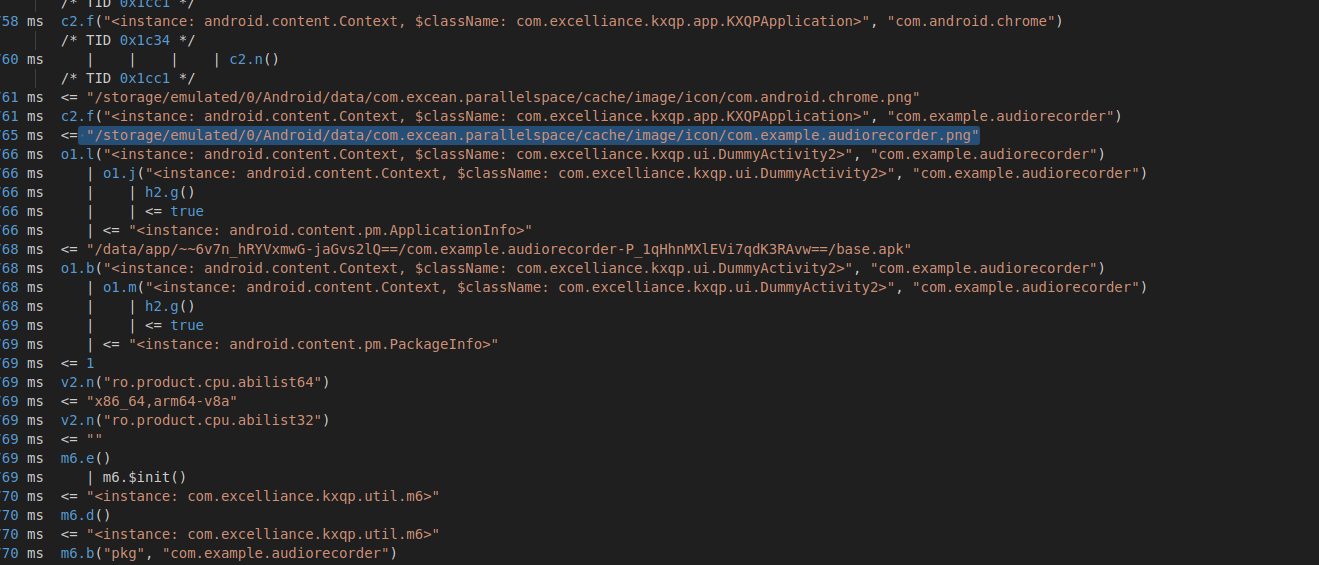
- Moving the icon image from the original apk storage path to the virtual environment. The parallel space app loads the icon of the original apk as a separate activity from its storage directory.

- Accessing NativeHelper API to get the files into the storage directory of the parallel space app with modified permissions and environment and fake the target app
uid = 0. This is done after modifying the environment of the new cloned application.
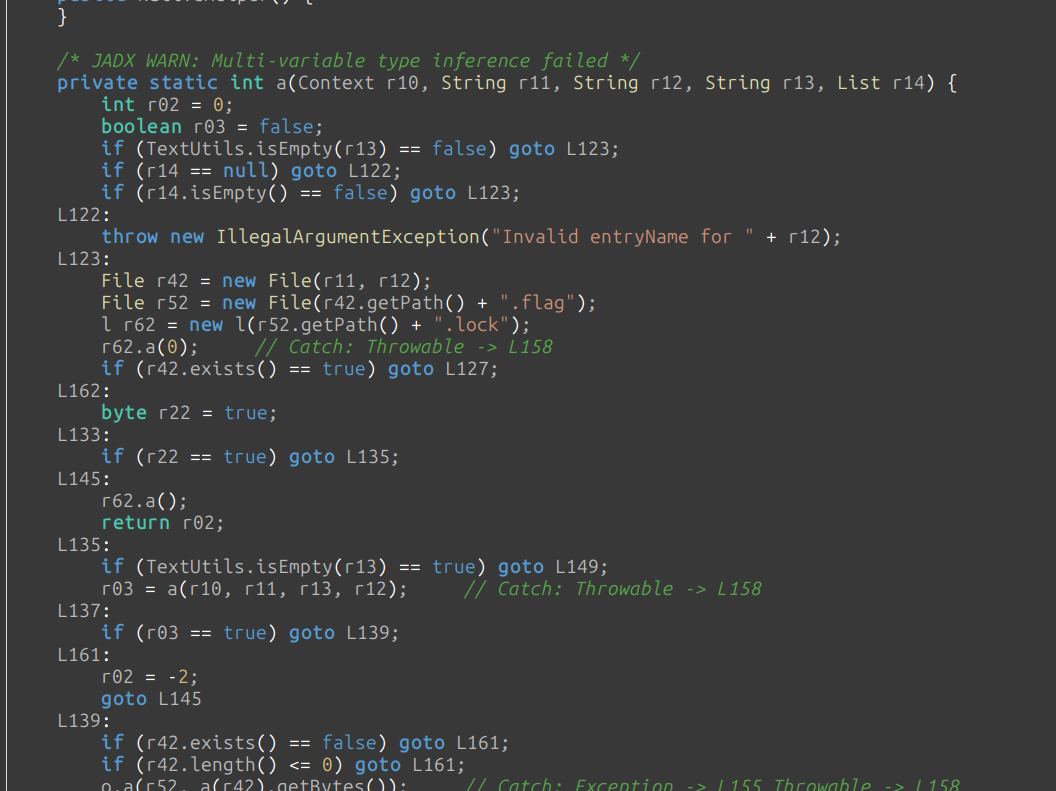
- Saving the native library by
.flagand.flag.lockextensions.
To prevent the app’s code from being reversed the Parallel Space app also loads the native liibrary code dynamically during the execution of the app. Then they are saved inside its storage directory and deleted if there is any error or the process is finished.

- This is to hide the native libraries from normal decompilation using tools like
apktooland hide their native functions using obfuscation.
Conclusion
As we explored in our review of Parallel Space, the ability to run multiple instances of an app on a single Android device is more than just a neat trick; for many, it’s a tool for separating work from personal life, or a necessary edge in competitive gaming. Understanding that this is achieved through sophisticated Android user profile virtualization—rather than simple emulation—explains why these tools are so effective and efficient.
But as powerful as virtualization is, it is not without its risks. The landscape is shifting rapidly. While Parallel Space App currently offers an efficient solution for multi-instancing, users must be aware that app developers are actively fighting back. Relying on virtualization to bypass serious security checks, such as those in banking apps or anti-cheat systems, is becoming increasingly risky and apps like Parallel Space are currently the most visible interfaces for this technology, describing Android’s multi-user architecture.